20✉️
Bulk SMS to customers
A new model has arrived, an Eid offer, the shop will be closed — write it once and send it to all your customers. Use the filters on the left to choose who gets it, and write the message on the right.
If you write {name} in the message, each person's own name is filled in.
📍 Where to find it: Left menu: Setup → SMS → Bulk SMS.
📷 Screenshots show the panel in Bangla — switch the panel to English and the same buttons appear in English.
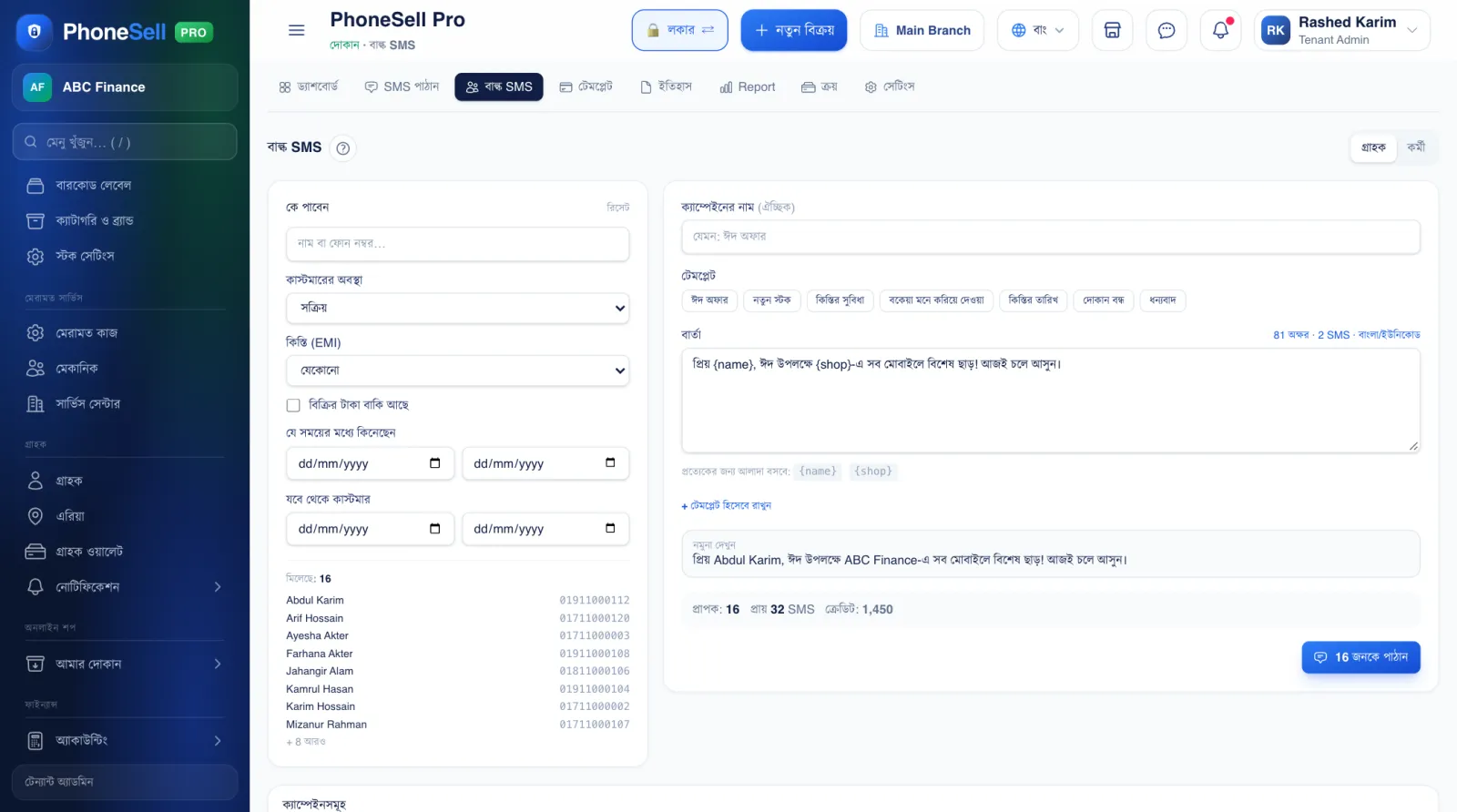 1234567
🔍 Tap the picture to enlarge
- 1Customer / Staff. Whether to send to customers or to your own staff.
- 2Who gets it. Search by name or number; filter by customer status and instalment status.
- 3Has unpaid sale due (baki). Tick to send only to people who owe you money. You can also filter by date — when they bought, or since when they've been a customer.
- 4Matches. Shows who fell within the filter, by name.
- 5Templates. Eid offer, new stock, due reminder — tap one and the text is filled in; change it as needed.
- 6Recipients and credit. How many people will get it, how many SMS it needs and how much credit you have.
- 7Send. Sending starts once you confirm; the campaign list below shows how many have gone.
💡 Good to know
- When your SMS credit runs out, buy more from SMS → Purchase.