9🛒
New sale (POS) — making a cash memo
This is the most-used page in the shop. Scan the products, take the money, tap Complete sale — stock goes down, the money is added to cash, profit is calculated, and the invoice is ready to print.
When you scan a phone's IMEI, exactly that set is sold and its warranty starts in the customer's name.
📍 Where to find it: The blue + New Sale button at the top, or menu: Sales → New Sale.
📷 Screenshots show the panel in Bangla — switch the panel to English and the same buttons appear in English.
Step by step
- In the Customer box, type a name or phone number and pick the customer (if new, “+ New”). For a walk-in customer you can leave it blank.
- Choose the Salesperson — the commission goes to them.
- Scan the phone's IMEI or the product barcode in the scan box, or type the name and pick it.
- Change the price or discount if needed.
- Enter how much you received into which account (cash/bank/bKash).
- Tap ✔ Complete sale — the invoice print page opens.
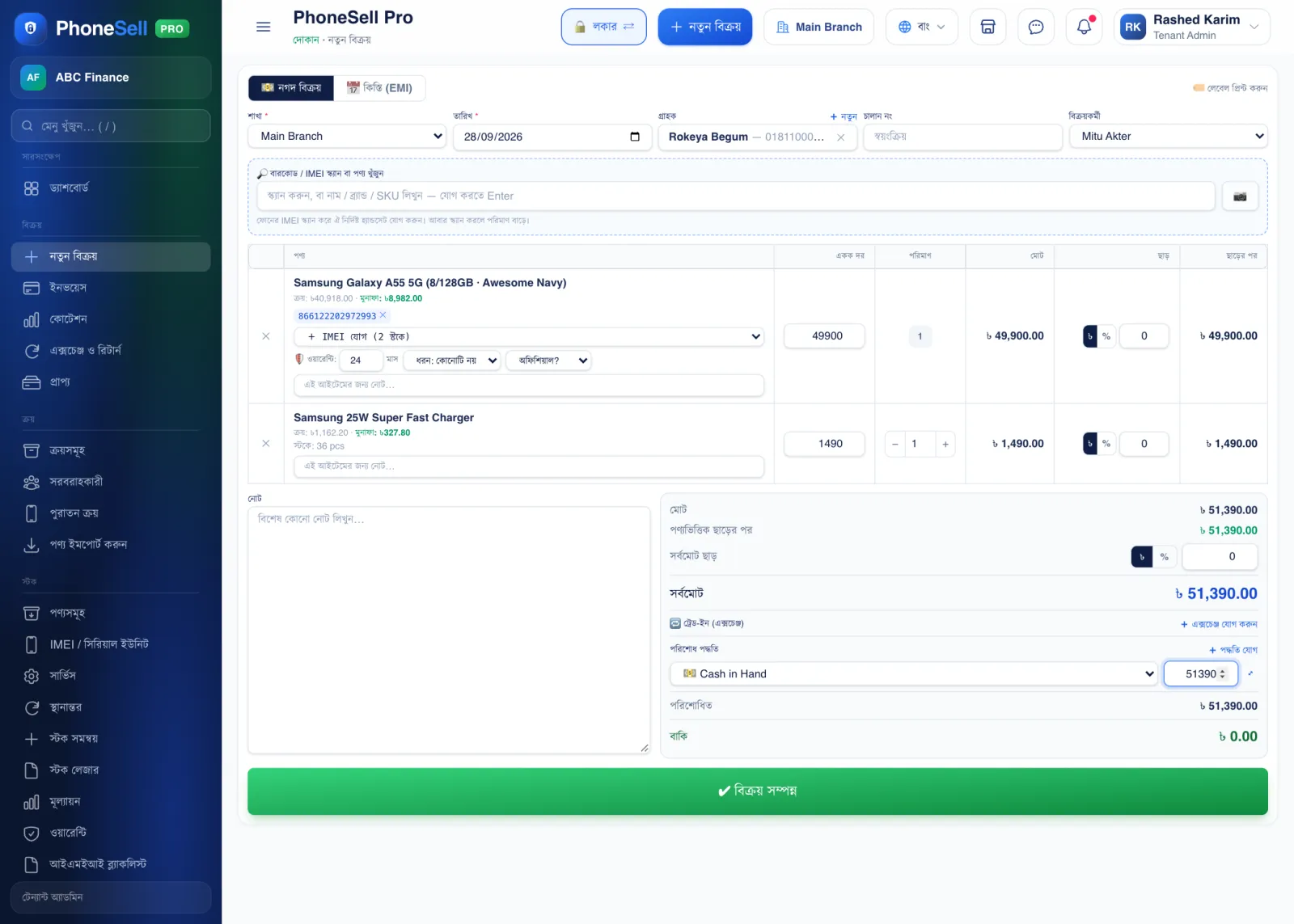 123456789
🔍 Tap the picture to enlarge
- 1Cash sale / Installment (EMI). For an instalment sale, choose the tab on the right — enter the down payment, number of instalments and profit %, and the instalment schedule is created.
- 2Customer. Search by name or phone number. For a new customer, tap “+ New” and add them right there.
- 3Salesperson. Who made the sale — their commission is calculated automatically.
- 4Scan or search. Scan an IMEI or barcode, or type a name and press Enter. Tap the camera button to scan with your phone's camera too.
- 5IMEI of the set being sold. Below it you can also change how many months of warranty it has.
- 6Global discount. A discount on the whole memo in taka (৳) or percent (%). You can also give a separate discount on each product line.
- 7Payment methods. How much you received into which account. If you took some in cash and some by bKash, tap “+ Add method”.
- 8Due. If you weren't paid in full, the rest is recorded against the customer — collect it later from “Receivables”.
- 9Complete sale. Tap it to save the sale; the invoice print page opens.
💡 Good to know
- If the customer hands in an old phone to take a new one, use Trade-in (exchange) at the bottom — it's covered in a later chapter.
- If you take card payments on a POS machine, that account's charge goes to expenses automatically — see the Cash & Bank chapter.
⚠️ Careful
- You can't sell on credit without choosing a customer — if you leave anything due, always pick the customer.