11💰
Collecting dues — Receivables
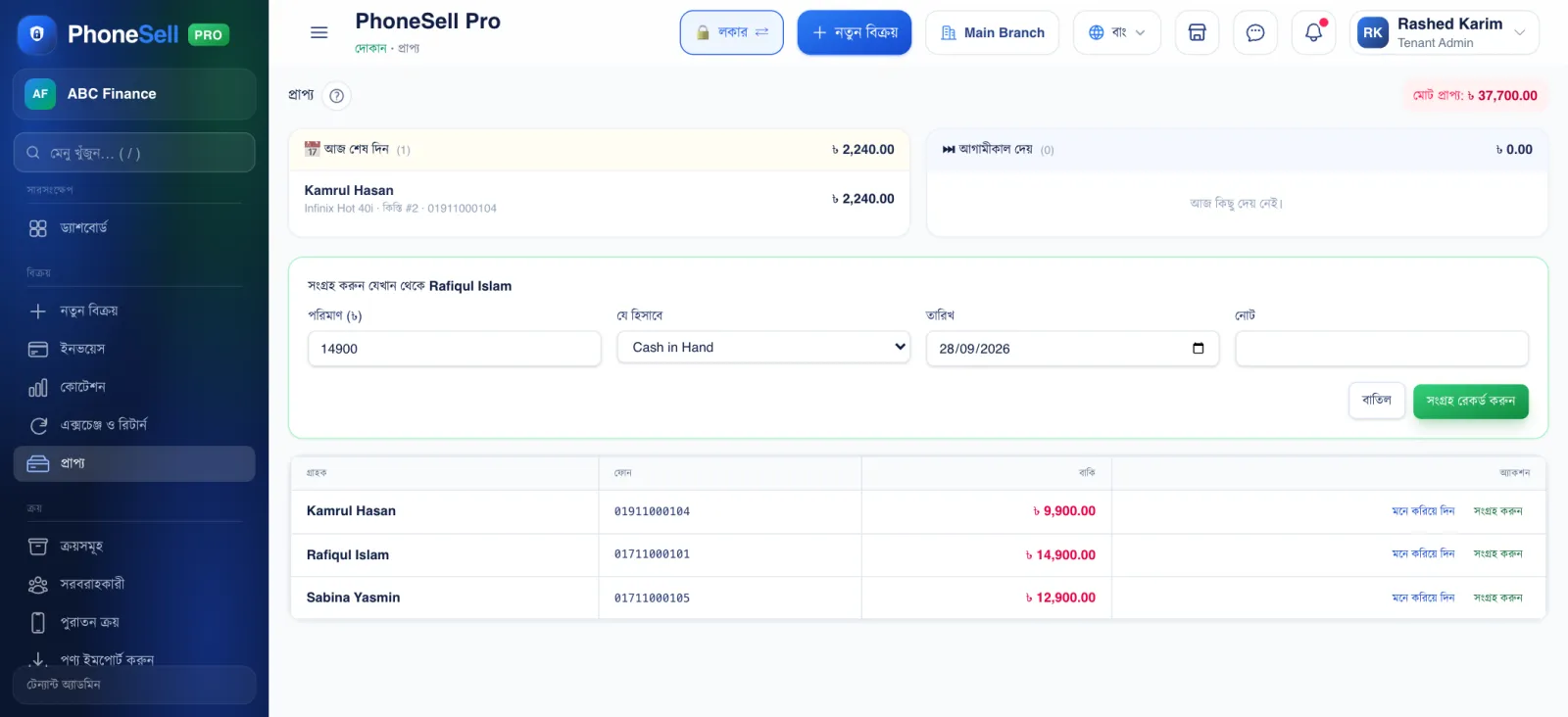
When you sell on credit, the amount is kept here against the customer. When the customer pays, tap “Collect” and record it — the due goes down and the money is added to cash.
The two cards at the top show separately whose instalment or due is payable today and tomorrow.
📍 Where to find it: Left menu: Sales → Receivables.
📷 Screenshots show the panel in Bangla — switch the panel to English and the same buttons appear in English.
 12345
12345🔍 Tap the picture to enlarge
- 1Total receivable. How much all customers owe you together.
- 2Due today / Due tomorrow. People who are supposed to pay today or tomorrow.
- 3Amount and account. How much you received and which account (cash/bank/bKash) you put it in.
- 4Record collection. Tap it and the due goes down; a receipt SMS can go to the customer.
- 5Remind. Sends the customer an SMS with their name and the amount due filled in.